Job Tags
What are they and why would we use them?
Job tags allow you to "tag" your job with any combination of a Show, Shot, Sequence, or Department name, a client code, or 5 other "generic" fields for easier search, sorting, and cost reporting.
Basics
Stock Tag Names
Five tags are named after common ways that studios manage their projects:
- show
- shot
- seq (sequence)
- client
- dept
Generic Tag Names
Five more are 'generic' names for those customers whose needs are not met by 1 or more of the 5 "stock" fields. These will appear in the QubeUI as:
- Custom1
- Custom2
- Custom3
- Custom4
- Custom5
If your site elects to use the generic fields, you should ensure that you use them consistently. If, for example, you have a "category" value, and you decide you want your Custom1 field to store your Category values, do not use the Custom1 field for anything else. Also do not store the Category values in any other of the custom fields. If you do erroneously enter a value into an incorrect field, you can always "modify" the job at a later date to fix this.
Future versions of Qube! will allow for an alternate name to be displayed for these "generic" fields.
Tags and Job Submission
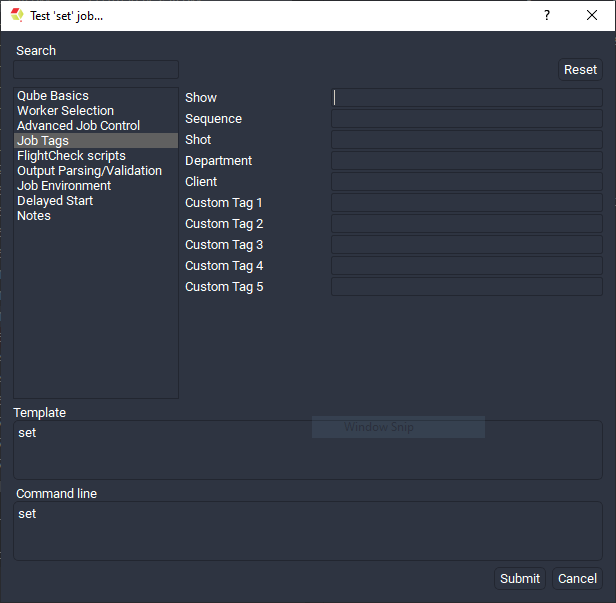
Tags and the Qube! API
The tags are attributes at the top level of the job object, and are all
prefaced with prod_.
-
prod_show -
prod_shot -
prod_seq -
prod_client -
prod_dept -
prod_custom1 -
prod_custom2 -
prod_custom3 -
prod_custom4 -
prod_custom5
They are accessible as top-level keys in the job dictionary as:
job['prod_show'],``` job['prod_seq']`, etc...