How to troubleshoot licensing issues
Qube! licenses are node-locked, and are tied to the "hostid" value in the license file, which is the MAC address of your supervisor. If your license is not installed correctly or has the wrong hostid, Qube! will show as having no licenses installed.
You can check that your licenses are installed and working in the UI or from the command-line.
The command utility "qbping" displays the license count and MAC address:
>qbping
supervisor - active - tag: 192.168.2.10 00:59:7A:3B:F6:79 7.5-2a bld-custom
linux -  - host - 0/5 unlimited licenses (metered=0/-1) - mode=0 (0).
In the UI, the license count shows in the title bar of the UI, but will not update on machine other than the supervisor if you've just installed a new license.
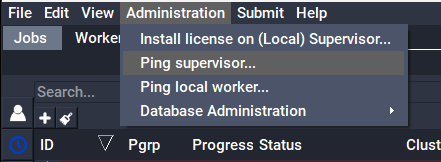
The best way to use the UI to check the license count and MAC is with
QubeUI->Admin->Ping supervisor, which will display the information in a
dialogue box:
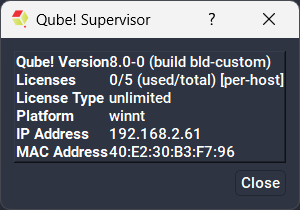
If you find that you only have two licenses available, check that your license's hostid matches your supervisor's MAC address, and that the qb.lic license file is installed in the correct location
-
Linux & macOS
/etc/qb.lic -
Windows
C:\ProgramData\Pfx\qube\qb.lic
Also ensure that the qb.lic file is saved in plaintext format, and has not extra characters that were not part of the original license string.