Qube Locker
QubeLocker is a small application for locking and unlocking slots on an artist's workstation.
-
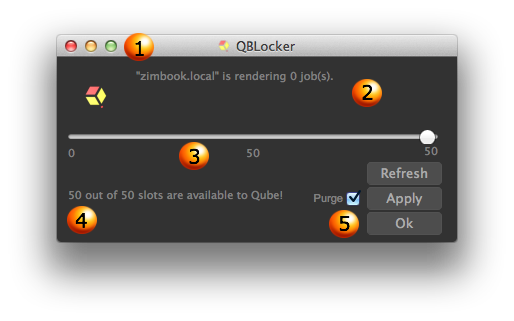
Minimize: QBLocker will run from your system tray, leaving valuable screen real estate to other applications.
-
Machine and Current Jobs: This displays the hostname and list of the jobs your machine is running
-
Slider: A slider to determine how many slots you would like to lock or unlock
-
Slots details: The amount of slots your machine currently has available to Qube!
-
Buttons:
-
Purge:
Refresh: Updates your machines status-
Checked: will kill the jobs that are currently running on your machine
-
Unchecked: Will wait for the currently running jobs to finish before making the slots available/locked
-
-
Apply: Applies the selected slider settings
-
Ok: Confirms and minimize qubelocker
-