Basic Installation Verification
Verify Supervisor installation
On the supervisor, start the Qube! US. It should connect to the supervisor service and show the supervisor hostname and license count in the UI title bar:

If you see 0 licenses you will need to install the licenses on the supervisor. See if you have a license key to install.
Test the supervisor connectivity
Use the Qube! UI Administration menu to test the supervisor's network connectivity from the worker machine:

It should bring up a dialog:

If you see this, your supervisor is up and running and responding to requests.
Verify Worker installation:
The simplest test possible is to submit a job that simply runs the
"set" command, which does nothing but print out the operating
system's environment variables. You can see what it's expected to do
by opening a cmd prompt on Windows or a Terminal on OS X and simply
typing set and hitting <Enter>.
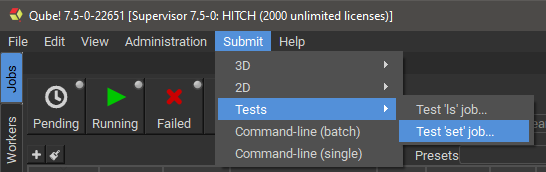
Start the Qube! UI, and select the Submit->Tests->Test 'set' job
menu item.
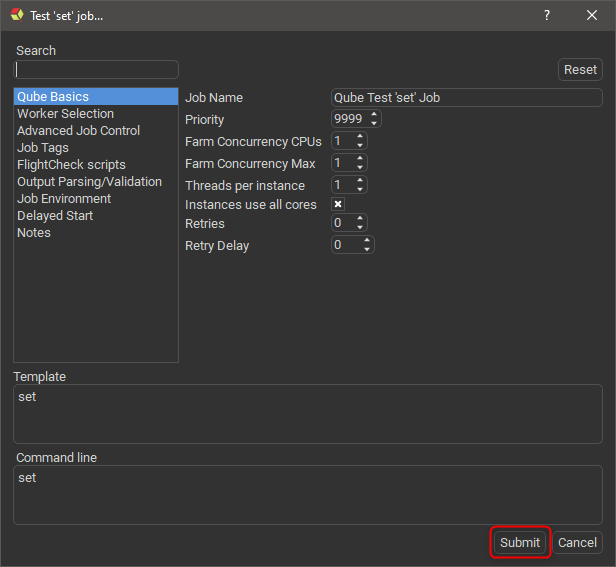
Then, just click "Submit":
Go to the Jobs Panel in the Qube! UI, and you should see the job in the list (it will be named "Qube Test 'set' Job"). After a short period of time you should see the job in a "Complete" state.\
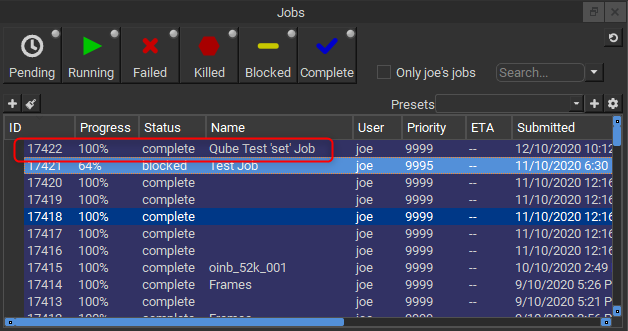
Note that the ID of your job will be different from the screenshot above.